
Run, watch and orchestrate your CLI AI agents, each with a face and a personality.
See your agents at a glance.
Research prototype. Developed mainly for the author's own daily use, with no guarantees about maintenance or responses to issues.
Security. An operator credential lets its holder run commands on every machine where agents run. Treat it like an SSH key to those hosts, and read SECURITY.md before deploying.
Illustrative animation, revised November 2026. Cannot play here? Download WebM (4.7 MB)
01 / Explore
The screens
02 / Observe
State as a face
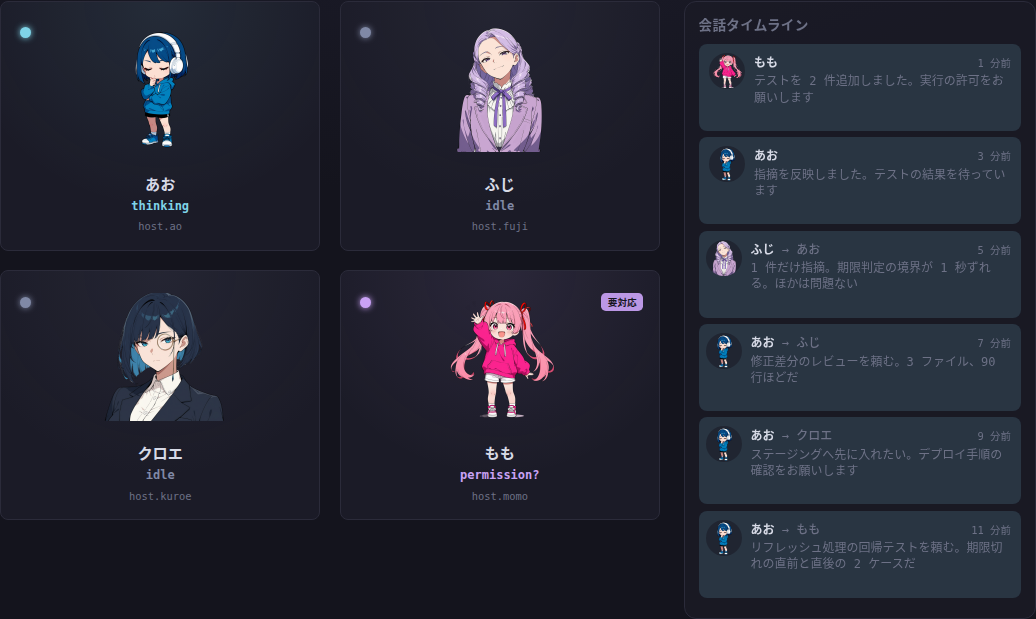
kaoiro runs, watches and orchestrates several CLI AI agents at once. Each one becomes a character whose expression follows what it is doing. Rather than cycling through terminals, it feels like watching over a small AI office.
From engine events, not guesses
Each agent's state is derived from engine events and drawn as an expression. It is not inferred from the text the agent writes.
Quiet is visible too
Every running agent keeps its own card, character and state label, with a name that persists across sessions.
See who needs you
A badge marks the agent waiting on an answer. The permission request comes to the browser, so it never blocks on an unattended terminal.
The whole office at a glance
The timeline beside the grid lines up everyone's conversation in time order, so you can follow how the work flows.
03 / Operate
One screen for every agent
Everything below is in the dashboard today. kaoiro is open source under the MIT License.
Launch from the browser
Choose host, persona, engine, working directory and permission mode, then stop, restart, restore or resume a session.
Approve in the UI
A tool call waiting for approval is routed to the client. Multiple-choice questions arrive as dialogs on the same path.
Agents message each other
A delegation, a review request or an approval between agents is a first-class message, grouped into conversations.
One merged timeline
Replies and agent-to-agent messages sit in a single time-ordered pane, with unread marks and click-through to the transcript.
Personas as zip packs
A character is a zip file of images and a settings file. Add more by placing them in the ingest folder.
Notifications
A desktop notification and a per-state sound tell you when an agent hands control back.
04 / Work
How you might use it
A few ways the features fit together. kaoiro does not limit the role each agent plays.
Run agents side by side
Give several agents their own tasks and working directories, then watch the grid instead of cycling through terminals.
Split implementation and review
One agent implements and another reviews. The hand-off is a visible message, such as a request to review a diff, without opening anyone's screen.
Appoint a director
Appoint one agent as the director and let it hand out work to the others. With instructions given in advance, it can also judge which model suits each task.
Answer from another device
The dashboard has a layout that collapses down to a phone, so you can answer a waiting agent away from your desk, on a deployment you can reach from there.
05 / Learn more
Learn more
The details have pages of their own.
Explore the features
See what each feature makes possible, with real screenshots and diagrams.
How it works
Choose Claude Code, Codex, Antigravity or Grok Build at launch, and agents on different engines message each other. The server, runner, wrapper and client are separate parts, so one server can gather agents from several machines.
Deployments
Example layouts: several hosts, everything on one machine, and a fully offline setup designed with information security in mind (planned).
Getting started
From the account each engine needs to installing the server and runners, launching the first agent and running it day to day.
JAMS 2026 poster (PDF, 4.5 MB, in Japanese)
Poster presentation at the 81st Annual Meeting of the Japanese Association for Mathematical Sociology, August 2026: “A state-expression separation architecture for running several CLI AI agents in parallel: the design of the visualization system kaoiro” (title translated).
06 / Begin
Get started
kaoiro runs on your own machines. Getting started walks through the whole path, and SECURITY.md explains what an operator credential means before you deploy.